Communication types
EtherCAT has two communication paths: PDO (real-time data such as motor position and speed) and Mailbox (configuration parameters such as setting the operating mode). In day-to-day development you spend 90% of your time on PDO. The recommended way to access PDO is struct mapping: highest performance, least code.
EtherCAT provides two main communication paths: process data communication (PDO) and mailbox communication.
Process data communication (PDO)
PDO (Process Data Object) is cyclic real-time data, exchanged on every communication cycle.
How it works
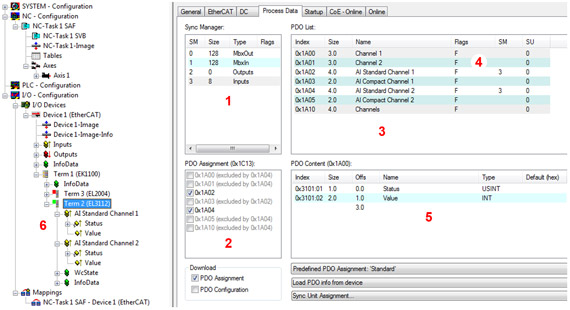
RxPDO: master → slave (control commands: target position, velocity and so on) TxPDO: slave → master (feedback data: actual position, status and so on)
PDO characteristics
- Real time — microsecond-level latency
- Cyclic — exchanged on a fixed cycle
- Deterministic — communication time is predictable
- Efficient — a single frame can carry data for several slaves
- Payload — small (a few bytes to a few hundred bytes)
PDO mapping configuration
PDO mapping tells the slave which data you need. In the vast majority of cases you do not configure it by hand — do it in the Darra configuration tool, or let the SDK configure it automatically from the ESI file. The manual configuration below only explains the principle and can be skipped.
Use DARRA EtherCAT Master Tools to configure PDO mapping:
- Visual PDO mapping editor — configure through a graphical interface
- Export configuration file — export a DENI configuration file for production
- Automatic validation — check that the configuration is valid and avoid manual mistakes
For the vast majority of users, configuring in the tool is enough. Hand coding is needed only when you have to change the PDO mapping dynamically at runtime.
Manual PDO mapping configuration (advanced)
The code below shows the principle behind PDO mapping. Configure the RxPDO mapping (master → slave) over SDO:
var slave = master.Slaves[0];

// 1. Disable the RxPDO mapping (0x1600)
slave.CoE.SDOWrite(0x1600, 0x00, new byte[] { 0 });

// 2. Configure the objects to be mapped
slave.CoE.SDOWrite(0x1600, 0x01, BitConverter.GetBytes(0x60400010u));  // Control word (0x6040, 16-bit)
slave.CoE.SDOWrite(0x1600, 0x02, BitConverter.GetBytes(0x607A0020u));  // Target position (0x607A, 32-bit)
slave.CoE.SDOWrite(0x1600, 0x03, BitConverter.GetBytes(0x60FF0020u));  // Target velocity (0x60FF, 32-bit)

// 3. Enable the RxPDO mapping (write the number of mapping objects)
slave.CoE.SDOWrite(0x1600, 0x00, new byte[] { 3 });

// 4. Assign the PDO mapping to Sync Manager SM2
slave.CoE.SDOWrite(0x1C12, 0x00, BitConverter.GetBytes((ushort)0));        // Disable the SM2 PDO assignment
slave.CoE.SDOWrite(0x1C12, 0x01, BitConverter.GetBytes((ushort)0x1600));   // Assign RxPDO 0x1600 to SM2
slave.CoE.SDOWrite(0x1C12, 0x00, BitConverter.GetBytes((ushort)1));        // Enabled (1 PDO)
Ways to access PDO data
Option one: struct mapping (recommended)
Map PDO memory directly with a struct: zero-copy reads and writes, highest performance.
Define the PDO struct
using System.Runtime.InteropServices;

// Output PDO struct (master -> slave)
[StructLayout(LayoutKind.Sequential, Pack = 1)]
public struct ServoDriveOutputPdo
{
    public ushort ControlWord;      // 0x6040 control word
    public int TargetPosition;      // 0x607A target position
    public int TargetVelocity;      // 0x60FF target velocity
}

// Input PDO struct (slave -> master)
[StructLayout(LayoutKind.Sequential, Pack = 1)]
public struct ServoDriveInputPdo
{
    public ushort StatusWord;       // 0x6041 status word
    public int ActualPosition;      // 0x6064 actual position
    public int ActualVelocity;      // 0x606C actual velocity
}
Use struct mapping
// Get a slave
var slave = master.Slaves[0];

// Get the struct mapping reference outside the loop (zero-copy, points into IOmap memory)
ref var inputs = ref slave.PDO.InputsMapping<ServoDriveInputPdo>();
ref var outputs = ref slave.PDO.OutputsMapping<ServoDriveOutputPdo>();

// Periodic control loop
while (running)
{
    // Read the input PDO
    var currentPosition = inputs.ActualPosition;
    var statusWord = inputs.StatusWord;

    // Write the output PDO
    outputs.ControlWord = 0x000F;          // Enable
    outputs.TargetPosition = 100000;       // Set the target position
    outputs.TargetVelocity = 3000;         // Set the target velocity

    // PDO data is sent and received automatically on a cycle through the event callback
    // master.Events.ProcessDataCyclicSync += (masterIndex) => { ... };

    Thread.Sleep(0);
}
Option two: byte array access
Access the raw bytes directly.
// Read the input PDO byte array
byte[] inputs = slave.PDO.Inputs;
int position = BitConverter.ToInt32(inputs, 2);  // offset 2 bytes

// Write the output PDO byte array
byte[] outputs = new byte[slave.PDO.Outputs.Length];
Buffer.BlockCopy(BitConverter.GetBytes((ushort)0x0F), 0, outputs, 0, 2);  // Control word
Buffer.BlockCopy(BitConverter.GetBytes(10000), 0, outputs, 2, 4);         // Target position
slave.PDO.Outputs = outputs;
Mailbox communication
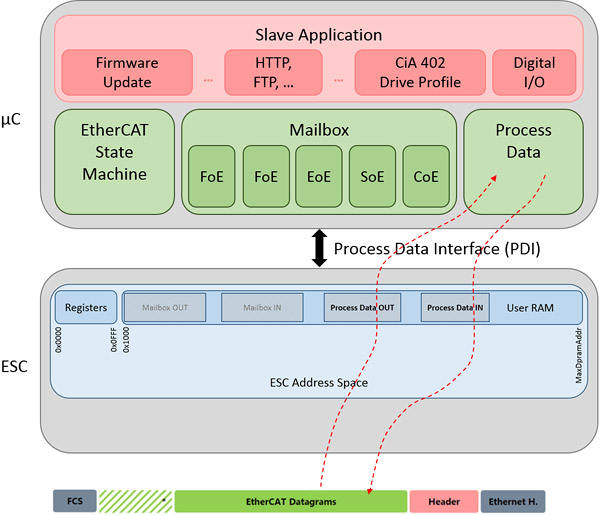
Mailbox is acyclic communication, used for configuration and diagnostics.
Mailbox characteristics
- Acyclic — communication on demand
- Not real time — response time is not deterministic
- Large payload — can carry large amounts of data
- Multiple protocols — several application-layer protocols are supported
- Available states — PREOP/SAFEOP/OP
SDO read and write (CoE protocol)
SDO write option one: SDOWrite by index (recommended)
Write a byte array by index and subindex; use BitConverter to turn numeric values into little-endian bytes.
// Write parameters of different types (SDOWrite returns bool; on false see slave.CoE.LastSdoError for the reason)
bool ok = slave.CoE.SDOWrite(0x6060, 0x00, new byte[] { 8 });              // Set the working mode (position mode)
slave.CoE.SDOWrite(0x6040, 0x00, BitConverter.GetBytes((ushort)0x0006));   // Write the control word (UNSIGNED16)
slave.CoE.SDOWrite(0x6081, 0x00, BitConverter.GetBytes(3000u));            // Set the velocity (UNSIGNED32)
slave.CoE.SDOWrite(0x6083, 0x00, BitConverter.GetBytes(1000000u));         // Set the acceleration (UNSIGNED32)
slave.CoE.SDOWrite(0x1008, 0x00, Encoding.ASCII.GetBytes("MyDevice"));     // Write a string
SDO write option two: object entry write (ObjectEntry)
When you organize code by object name, take the entry from the object dictionary (ODList[对象索引].OEList[子索引]) and write through it. CoEInstance has no indexer — you cannot skip ODList / OEList and index it directly as [索引][子索引] (it does not compile).
// Fetch an entry: object dictionary catalogue -> object -> subentry
var controlWordEntry = slave.CoE.ODList[0x6040].OEList[0];
controlWordEntry.Bytes = BitConverter.GetBytes((ushort)0x0006);   // Assigning to it performs the SDO write

// A failed write throws CoE_AccessDeniedException (no write permission / not allowed in the current state)
try
{
    slave.CoE.ODList[0x6081].OEList[0].Bytes = BitConverter.GetBytes(3000u);
}
catch (CoE_AccessDeniedException ex)
{
    Console.WriteLine($"对象 0x{ex.Index:X4}:{ex.SubIndex:X2} 当前不可写: {ex.Message}");   // Object 0x{ex.Index:X4}:{ex.SubIndex:X2} is currently not writable: {ex.Message}
}

// Same for vendor-private objects; the byte width comes from the manual
byte[] customData = new byte[] { 0x01, 0x02, 0x03, 0x04 };
slave.CoE.ODList[0x2000].OEList[0].Bytes = customData;
SDO read example
SDORead returns raw bytes and returns null on failure (it does not throw). Convert values with BitConverter using the object's width — the width must match the object, otherwise you get a wrong value or the slave aborts the request.
// Read + null check + explicit width conversion
byte[] modeRaw = slave.CoE.SDORead(0x6061, 0, false);        // Current mode (INTEGER8)
byte[] statusRaw = slave.CoE.SDORead(0x6041, 0, false);      // Status word (UNSIGNED16)
byte[] posRaw = slave.CoE.SDORead(0x6064, 0, false);         // Actual position (INTEGER32)
byte[] nameRaw = slave.CoE.SDORead(0x1008, 0, false);        // Device name (STRING)

if (modeRaw == null || statusRaw == null || posRaw == null || nameRaw == null)
{
    Console.WriteLine($"SDO 读取失败: {slave.CoE.LastSdoError}");   // SDO read failed: {slave.CoE.LastSdoError}
    return;
}

byte mode = modeRaw[0];
ushort statusWord = BitConverter.ToUInt16(statusRaw, 0);
int position = BitConverter.ToInt32(posRaw, 0);
string deviceName = Encoding.ASCII.GetString(nameRaw);

Console.WriteLine($"工作模式: {mode}");   // Operating mode: {mode}
Console.WriteLine($"状态字: 0x{statusWord:X4}");   // Status word: 0x{statusWord:X4}
Console.WriteLine($"实际位置: {position}");   // Actual position: {position}
Console.WriteLine($"设备名称: {deviceName}");   // Device name: {deviceName}
When you need the abort code / WKC detail, use the overload with out SdoReadResult:
byte[] raw = slave.CoE.SDORead(0x6041, 0, out SdoReadResult detail, false);
if (!detail.Ok)
    Console.WriteLine($"abort=0x{detail.AbortCode:X8} error={detail.Error} wkc={detail.Wkc}/{detail.ExpectedWkc}");
The ObjectEntry.Bytes getter folds every read failure into byte[0], which is indistinguishable from "the slave really returned an empty string". Use TryGetBytes(out byte[] data, out SDOError error) when you need to tell success from failure.
Bulk read and write with Complete Access
Read or write all subindexes of an object in one call.
// Batch-read the RxPDO mapping object (0x1600)
byte[] pdoMapping = slave.CoE.SDORead(0x1600, 0, completeAccess: true);
if (pdoMapping == null)
{
    Console.WriteLine($"CA 读失败: {slave.CoE.LastSdoError}");   // CA read failed: {slave.CoE.LastSdoError}
    return;
}

// Parse the data
byte subindexCount = pdoMapping[0];
Console.WriteLine($"PDO 映射项数量: {subindexCount}");   // PDO mapping entry count: {subindexCount}
Other mailbox protocols
Besides CoE (CANopen over EtherCAT), EtherCAT supports the following mailbox protocols:
| Protocol | Full name | Purpose |
|---|---|---|
| SoE | SERCOS over EtherCAT | For SERCOS drives, accessed through IDN parameters |
| FoE | File over EtherCAT | File transfer protocol for firmware updates, log downloads and so on |
| EoE | Ethernet over EtherCAT | Ethernet tunneling protocol that allows standard Ethernet communication |
| VoE | Vendor over EtherCAT | Vendor-specific protocol for special functions |
| AoE | ADS over EtherCAT | ADS protocol, used by ADS-capable devices to communicate with the system |
PDO vs Mailbox comparison
| Item | PDO | Mailbox (SDO) |
|---|---|---|
| Purpose | Real-time control data | Configuration and diagnostics |
| Cyclic or acyclic | Cyclic | Acyclic |
| Real-time response | Microsecond level | Millisecond level |
| Payload | Small (a few bytes to a few hundred bytes) | Large (up to several KB) |
| Available states | SAFEOP/OP | PREOP/SAFEOP/OP |
| Typical use | Position control, I/O read and write | Parameter setting, firmware update |
| Access method | Struct mapping, by name | Indexed read/write (SDORead / SDOWrite), raw bytes + explicit width |
Using both together
In practice you normally use PDO and Mailbox together:
// ===== 1. Initialisation phase - Mailbox configuration =====
master.SetState(EcState.PreOp);

// Configure drive parameters over SDO
slave.CoE.SDOWrite(0x6060, 0x00, new byte[] { 8 });                // Position mode
slave.CoE.SDOWrite(0x6081, 0x00, BitConverter.GetBytes(3000));     // Velocity
slave.CoE.SDOWrite(0x6083, 0x00, BitConverter.GetBytes(1000000));  // Acceleration
slave.CoE.SDOWrite(0x6084, 0x00, BitConverter.GetBytes(1000000));  // Deceleration

// ===== 2. Running phase - PDO real-time control =====
master.SetState(EcState.OP);

// Define the PDO struct
[StructLayout(LayoutKind.Sequential, Pack = 1)]
struct DriveOutput
{
    public ushort ControlWord;
    public int TargetPosition;
}

[StructLayout(LayoutKind.Sequential, Pack = 1)]
struct DriveInput
{
    public ushort StatusWord;
    public int ActualPosition;
}

// Get the struct mapping reference outside the loop (zero-copy, points into IOmap memory)
ref var outputs = ref slave.PDO.OutputsMapping<DriveOutput>();
ref var inputs = ref slave.PDO.InputsMapping<DriveInput>();

// Periodic control loop
while (running)
{
    // PDO: real-time data exchange (struct mapping, zero-copy, high performance)
    outputs.ControlWord = 0x000F;
    outputs.TargetPosition = targetPosition;

    // PDO data is sent and received automatically on a cycle through the event callback
    // master.Events.ProcessDataCyclicSync += (masterIndex) => { ... };

    var position = inputs.ActualPosition;
    var status = inputs.StatusWord;

    // Mailbox: read diagnostic information occasionally (not real time)
    if (needDiagnostics && DateTime.Now - lastDiagTime > TimeSpan.FromSeconds(1))
    {
        // Vendor object width per the manual; INTEGER16 / UNSIGNED16 are used here as examples
        byte[] tempRaw = slave.CoE.SDORead(0x2205, 0, false);
        byte[] voltRaw = slave.CoE.SDORead(0x2206, 0, false);
        if (tempRaw != null && voltRaw != null)
        {
            short temp = BitConverter.ToInt16(tempRaw, 0);
            ushort voltage = BitConverter.ToUInt16(voltRaw, 0);
            Console.WriteLine($"温度: {temp}°C, 电压: {voltage}V");   // Temperature: {temp}°C, Voltage: {voltage}V
        }
        lastDiagTime = DateTime.Now;
    }

    Thread.Sleep(0);
}
Performance comparison and choice
PDO access performance
- Struct mapping — zero-copy direct read and write (fastest); use it for: high-performance real-time control
- Access by name — requires a table lookup (slower); use it for: dynamic access and debugging
- Byte array — direct read and write by offset; use it for: low-level control
SDO access performance
SDORead+ explicit-widthBitConverter— coding complexity: medium, type safety: depends on the width matching the objectSDOWritebyte write — coding complexity: medium, type safety: same as above- Object entry (
ODList[i].OEList[s]) — coding complexity: low (names and metadata available), but the object dictionary must be loaded first
Best practices
PDO guidelines
// ✅ Recommended: use struct mapping for real-time control
ref var pdo = ref slave.PDO.OutputsMapping<MyPdoStruct>();
pdo.Value = 100;

// ❌ Avoid: byte array copying inside the real-time loop
var outputs = slave.PDO.Outputs;  // A memory copy happens
outputs[0] = 100;
slave.PDO.Outputs = outputs;      // Yet another memory copy
SDO guidelines
// ✅ Recommended: write with SDOWrite byte arrays, with an explicit width
bool ok = slave.CoE.SDOWrite(0x6081, 0x00, BitConverter.GetBytes(3000u));  // 0x6081 = UNSIGNED32

// ❌ Avoid: calling SDO frequently in a loop (every call is a blocking mailbox transaction)
while (running)
{
    byte[] raw = slave.CoE.SDORead(0x6081, 0, false);  // ❌ Very slow!
    // ...
}

// ✅ Correct: read once at initialisation and cache
byte[] cached = slave.CoE.SDORead(0x6081, 0, false);
if (cached == null) throw new InvalidOperationException($"SDO 读失败: {slave.CoE.LastSdoError}");   // SDO read failed: {slave.CoE.LastSdoError}
uint param = BitConverter.ToUInt32(cached, 0);
while (running)
{
    // Use the cached param value
}
Struct definition notes
// ✅ Correct: use Pack = 1 to ensure there are no padding bytes
[StructLayout(LayoutKind.Sequential, Pack = 1)]
public struct MyPdo
{
    public ushort Value1;  // 2 bytes
    public int Value2;     // 4 bytes
}  // Total size: 6 bytes

// ❌ Wrong: default alignment adds padding bytes
[StructLayout(LayoutKind.Sequential)]  // Default Pack = 8
public struct BadPdo
{
    public ushort Value1;  // 2 bytes + 2 bytes padding
    public int Value2;     // 4 bytes
}  // Total size: 8 bytes (does not match the PDO)