EtherCAT state machine (ESM)
New to EtherCAT
The state machine sounds complicated, but the core is OP = fully started. Only in OP can the master and the slave exchange data normally. The INIT → PREOP → SAFEOP steps before it are preparation, and the SDK performs them automatically.
State machine overview
Every EtherCAT slave has a state machine that controls its operating state:
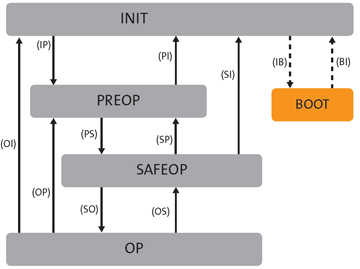
State descriptions
| State | Name | Value | Function |
|---|---|---|---|
| INIT | Init | 0x01 | Register access only, no communication |
| PREOP | Pre-Operational | 0x02 | Mailbox communication available, configurable |
| SAFEOP | Safe-Operational | 0x04 | Inputs valid, outputs held at safe values |
| OP | Operational | 0x08 | Fully started, normal data exchange |
| BOOT | Bootstrap | 0x03 | Special mode for firmware updates |
States and transitions in detail
INIT state
Function:
- The master can read and write ESC registers (port status, SII information, and so on)
- The slave identity can be identified (vendor ID, product code)
- No application-layer communication
Transition to PREOP:
- The master configures the DL registers and the configured address (0x0010)
- The mailbox Sync Managers (SM0/SM1) are configured
- If DC is used, the system time is synchronized to the reference clock
PREOP state
Function:
- Mailbox communication is available; parameters can be read and written over SDO (Service Data Object)
- Process data mapping is configured
- No process data communication
Transition to SAFEOP:
- Startup commands and the process data configuration are downloaded
- The process data Sync Managers are configured (SM2 outputs / SM3 inputs)
- FMMU channels are configured
- DC parameters are configured (cycle, start time, and so on)
- The master starts sending process data frames
- The slave starts updating input data
SAFEOP state
Function:
- Mailbox communication and process data communication both run
- The slave provides valid input data
- Outputs stay at safe values (0V rather than 24V)
Transition to OP:
- If DC is used, the slave checks the DC settings and locks its PLL
- Output data is monitored for arrival before the DC Sync event
- The master starts sending valid output values
- After the slave confirms OP, it applies the received values to its outputs
OP state
Function:
- Inputs and outputs are both valid
- Precise synchronization with DC (if used)
- Mailbox communication is available
- Normal cyclic data exchange
Error handling:
- If an error occurs in OP, the slave falls back to a lower state automatically
- An error flag is set and an AL Status Code is provided
- The master can read the error code for diagnostics
Transition flow
Code examples for state transitions
Option one: switch state directly with SetState
// Switch step by step to the OP state
// The library fully builds in step-by-step switching and auto-configuration, so you can switch the state machine freely
master.SetState(EcState.Init);
master.SetState(EcState.PreOp);
master.SetState(EcState.SafeOp);
master.SetState(EcState.OP);

// Check the current state (State is a read-only property; always use SetState to switch state)
Console.WriteLine($"当前状态: {master.State}");   // Current state: {master.State}
Option two: SetState overload that returns error information
// SetState(state, out error) returns bool; the error message comes back through the out parameter
if (!master.SetState(EcState.PreOp, out string message))
{
    Console.WriteLine($"状态切换失败: {message}");   // State transition failed: {message}
    return;
}

// Continue switching to OP
master.SetState(EcState.OP);

// For async scenarios use SetStateAsync(EcState), which returns Task<bool>
Error detection and recovery
// In practice it is better to use the built-in event handling for degraded events
// Check the state
if (master.State != EcState.OP)
{
    Console.WriteLine($"状态异常: {master.State}");   // Abnormal state: {master.State}

    // Try restarting
    try
    {
          if (!master.SetState(EcState.PreOp, out string message))
          {
               Console.WriteLine($"状态恢复失败: {message}");   // State recovery failed: {message}
               return;
          }
          Console.WriteLine("状态恢复成功");   // State recovered successfully
    }
    catch (Exception ex)
    {
        Console.WriteLine($"恢复失败: {ex.Message}");   // Recovery failed: {ex.Message}
    }
}